
One of the most asked questions for new graduates is how to apply for the PRC Board Examination and what the requirements are.
If you are a new graduate and planning to take the upcoming board examination, whether for Teachers (LET), medicine-related courses (Medicine, Nursing, Medical Technologists, etc.), Criminology (CLE), or Engineering courses (Civil, Electrical, Mechanical Engineer, etc.), then this article will give you a comprehensive guide on how to do it.
How to Apply for the PRC Board Examination
If you are a first-time applicant, you need to create a LERIS (Licensure Examination & Registration Information System) account for the online application.
This is an online portal where aspiring applicants create an account to file their initial registration for the board exam or to renew licenses.
To do it, follow the steps provided below.
PRC Initial Registration and Appointment of Application Guide
To start your online initial registration, prepare the following:
- Your LERIS application photo must be a 2×2 ID with a plain white background, taken within the last six months featuring your true likeness, professional attire with a collar, fully visible ears, a neutral expression without teeth showing, no eyeglasses or colored contact lenses, no heavy makeup, and no headwear or accessories.
- Valid ID
- ₱900.00 transaction fee
- This is not necessary, but when filling out your information, it is recommended to have your PSA on your side to enter the details accurately.
1. Visit their official website at https://online.prc.gov.ph/.
For new applicants, as seen in the screenshot below, click the “REGISTER” button, scroll down, and tap “I AGREE” to start.
2. Fill out the form, such as your complete name, birth date, email address, and your unique password.
Make sure your email address is active and working because they will send you a confirmation link to verify your account.
Once done, click the button “REGISTER.”
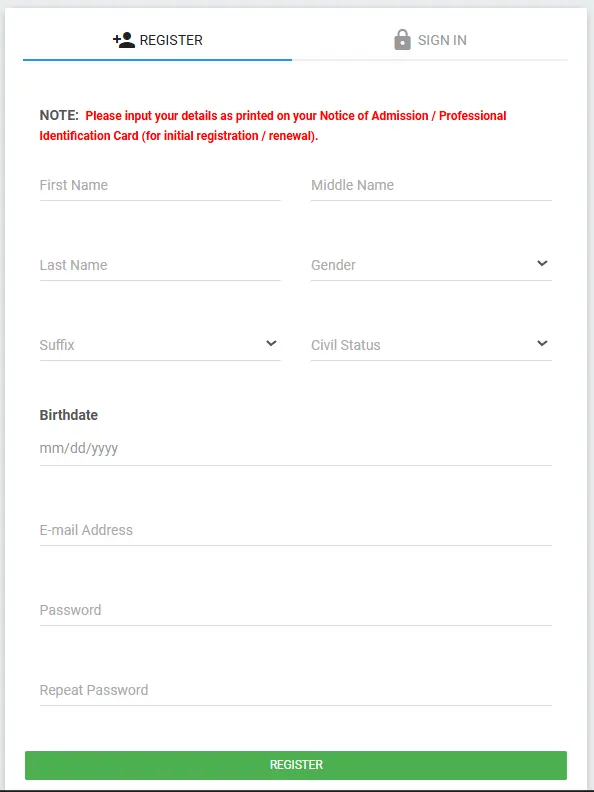
3. Ensure your account details are correct because once you miss or mistype some information, you will be required to visit the nearest PRC branch for correction.
If you are confident that your details are accurate, tap the box beside “I’m not a robot,” then click “AGREE/CONFIRM” and tap “YES” to confirm your correct name and birthdate.
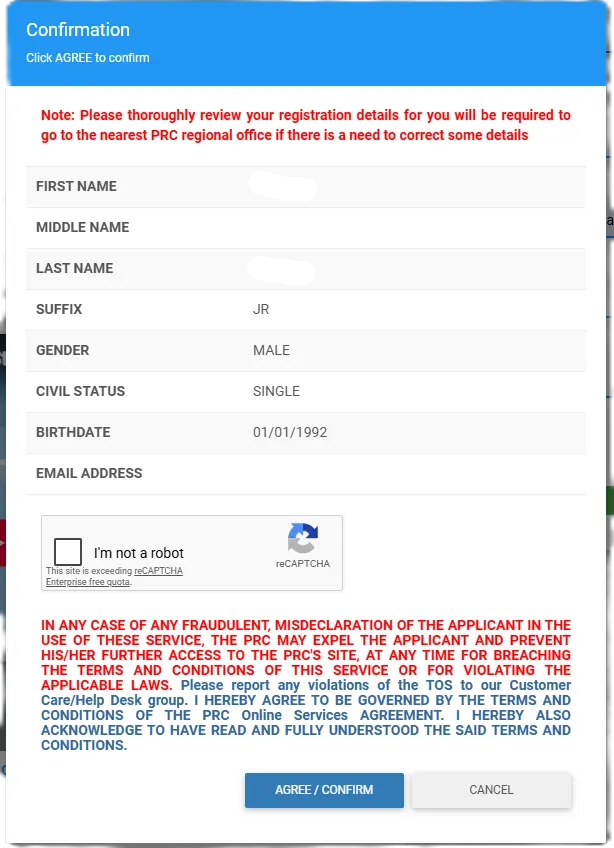
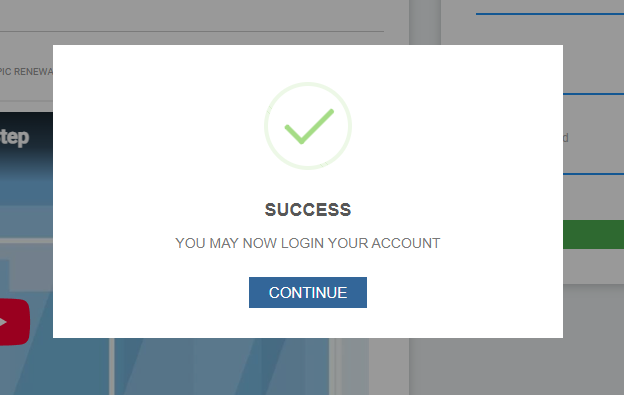
4. Then, you will see a “SUCCESS” message.
Please check your email verification link to log in.
Note: There are times when sending the confirmation code/link takes longer than usual. So be patient.
5. Once you verify your account and can sign in, complete your personal information, contact details, emergency contact, family background, education, employment, valid ID, and other information.
Then, upload your 2×2 ID with a white background.
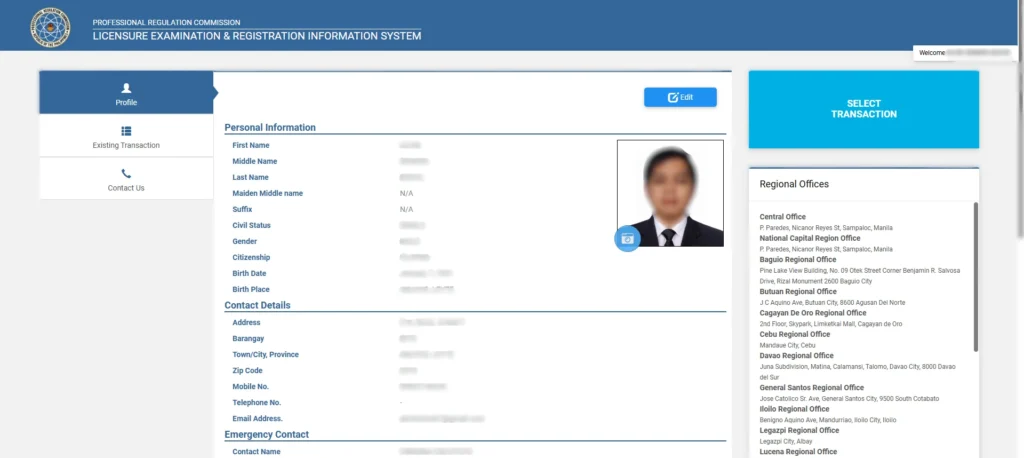
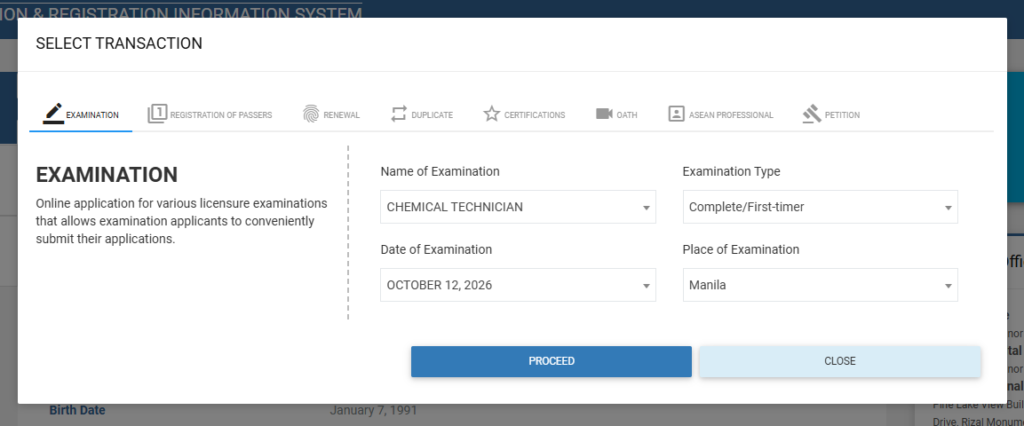
6. After completing your personal profile information, click the “SELECT TRANSACTION” button > I AGREE > Proceed > Proceed > OK > OK.
Name of Examination: Select the exam you want to take (Chemical Technician, Professional Teachers, Physician, etc.)
Examination Type:
- Complete/First-timer – if this is your first time taking the specific board exam.
- Repeater – if you want to retake the board.
- Removal/Conditional – this is only applicable to board courses that have a removal/conditional remark in their previous exam, such as Nursing.
Date of Examination: Select your preferred date, but it is automatically assigned.
Place of Examination: Select your preferred testing center to take the board.
Once completed, tap “PROCEED.”
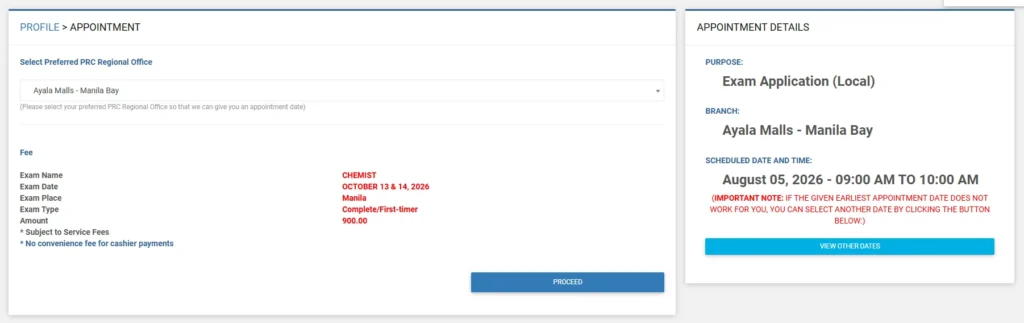
7. In the appointment section, select your preferred PRC Regional Office.
This is where you need to submit your physical documents, such as Transcript of Records (TOR), PSA, valid ID, case study (for selected board), and more.
If you are not available on the date set by the system, you may “view other dates” that fit your schedule.
Then, tap the button PROCEED.
8. To complete your initial registration, pay a ₱900.00 transaction fee to selected payment methods such as GCash, Maya (PayMaya), banks, and at the PRC Cashier.
Once done, go back to your LERIS profile and tap “Existing Transaction.”
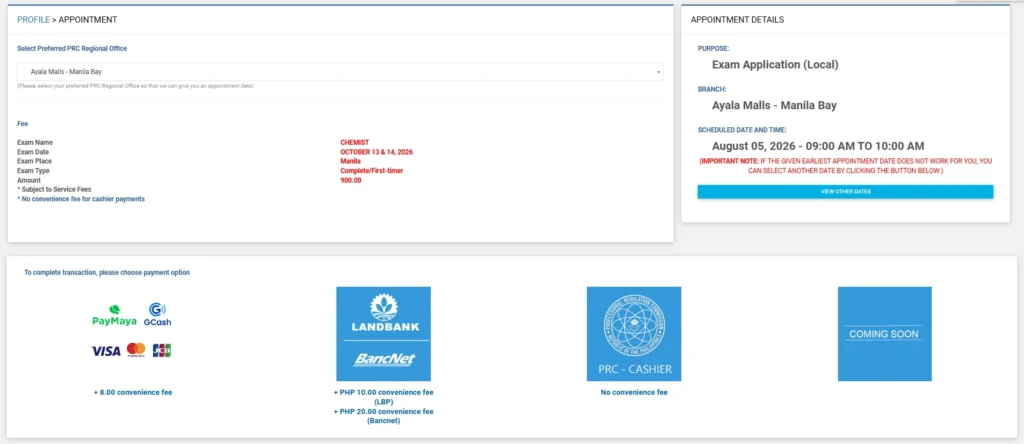
Note: Keep extra funds ready for the transaction fee. Charges vary depending on the online payment platform you use, so carefully review the total amount before clicking confirm.
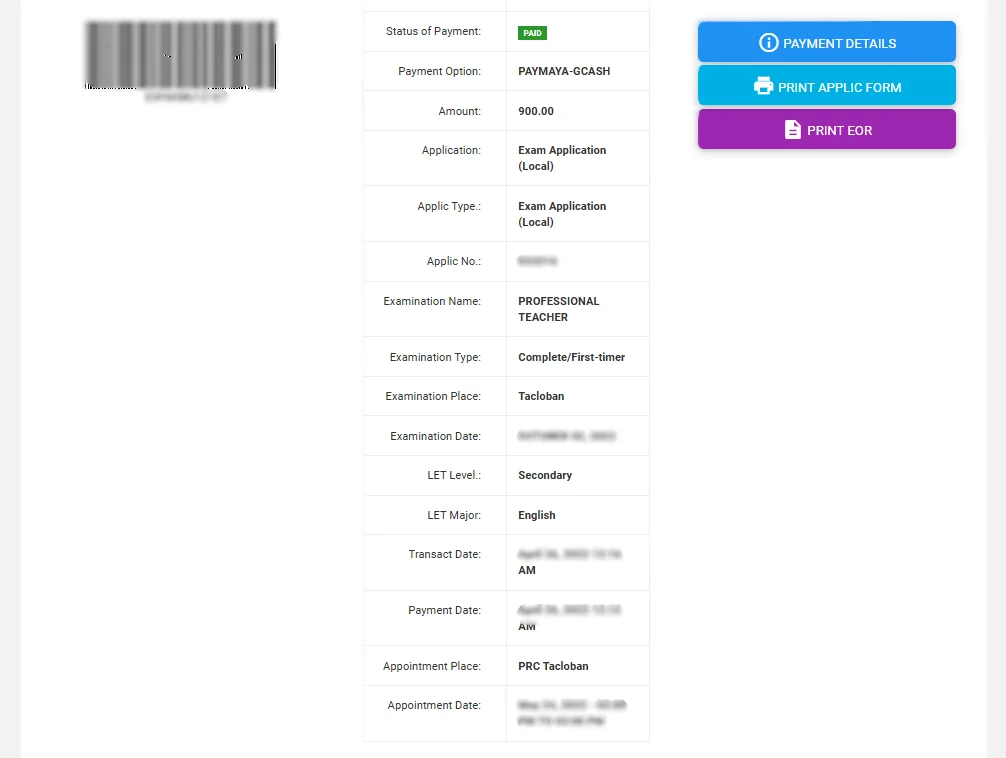
9. In the existing transaction, print the APPLIC FORM and EOR.
APPLIC FORM is a generated application form by the system using your profile information and the type of examination you chose.
Click the “PRINT APPLIC FORM “button to download and print.
EOR stands for Electronic Official Receipt and will be generated once you have completed your transaction fee of ₱900.00.
Tap the “PRINT EOR” button to download and print.
Submission of Documents at PRC Branches Guide
Once you have completed your initial registration at the LERIS site and have your appointment date, you have to bring the following:
1. Printed LERIS Application Form with your signature
2. Printed EOR or Electronic Official Receipt
3. Original and Photocopies of Required Documents (such as your Transcript of Records, College Diploma, and PSA Birth Certificate/Marriage Certificate if applicable, depending on your specific board exam requirements)
4. Passport-sized ID Pictures (matching the specifications: plain white background, professional attire with a collar, visible ears, and no accessories—bring a few extra copies just in case)
(Note: You may also bring your 2 x 2 ID Pictures as backup)
5. Documentary Stamp Tax (DTX)
6. Summary of Clinical Cases (Case Study) for selected board courses such as Nursing and Midwifery.
Practical Tips for Your PRC Filing Day
1. Check your documents. The day before your appointment date, make sure to double-check all documents to avoid delays in submission.
2. Arrive ahead of time. Don’t go to the nearest PRC branch at your scheduled time. If possible, arrive early because an attendant will give you a priority number for queuing.
3. Bring food or snacks. You are not the only applicant there. So, better bring your own food, water, or snacks so you do not need to go out to buy one.
4. Inquire with the attendant. Some applicants don’t know what to do when they arrive at the PRC branch. When you are there, don’t hesitate to ask any attendant about the process, such as how to get a priority number and which door is for filing, etc.
5. Secure your Notice of Admission (NOA). If you have submitted your documents, you will receive your Notice of Admission. Secure it in a safe place, as that is the only thing you need to present during the board examination.
Guide for Repeaters: Online Application and Document Submission
Repeater applicants are not required to go to the PRC branch.
What you are going to do is log in to your LERIS account, pay ₱900.00, and wait for your status to become “COMPLIED” and “ISSUED.”

If your Status of Compliance is ” COMPLIED ” and ” ISSUED,” the system will generate a downloadable Notice of Admission for you.
Download and print it, as that serves as your updated NOA to be presented during the exam.
However, there are instances when an applicant needs to be physically present at the PRC branch to submit documents for updates.
If you have this concern, you need to go there and present the documents they are asking for.
Final Thought
Taking the board exam requires careful attention to detail, from encoding accurate personal information and following strict photo guidelines online to preparing all physical documents and receipts for your scheduled PRC appointment.
Double-checking every step of your LERIS registration and ensuring your payment includes the necessary buffer for transaction fees will save you from stressful delays and processing hiccups.
Approach your application with patience and proper preparation, and treat this initial milestone as your confident first step toward becoming a licensed professional.
If you have questions or need clarification, comment below.
